Master the Market Maker Models using MMXM Model Checklist Indicator
Meta Description: Automate and complete the MMSM/MMBM checklist on TradingView. Eliminate emotional bias from your trade executions.
🎯 Algorithmic Decision Shield Tailored for MMXM Traders
Trading Market Maker Models (MMSM/MMBM) demands strict discipline and real-time tracking of multiple confluence factors. The MMXM Model Checklist automates this verification process, visually highlighting original consolidations, liquidity sweeps, and market structure shifts to filter out low-probability entries.
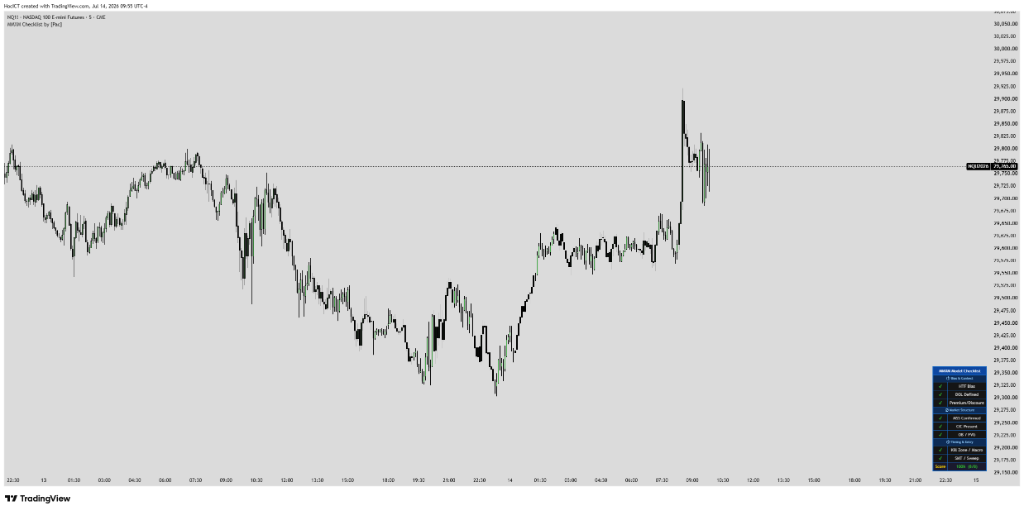
1. Algorithmic Nature & Live ICT Theory
The Market Maker Model (MMXM) comprises the Market Maker Buy Model (MMBM) and Sell Model (MMSM). The axis of symmetry is the original consolidation range. The IPDA algorithm expands price away from this range to gather liquidity, triggers a Smart Money Reversal (SMR), and redistributes price back to the source. Tracking these phases helps traders ride institutional order flow.
⚙️ Key Features
- Displays an on-chart checklist summarizing MMXM cycle phases.
- Identifies the key original consolidation range.
- Scans for SMR (Smart Money Reversal) and confirms MSS shifts.
- Polished table overlay UI that is fully customizable in position.
🎯 Core Benefits
- Provide a systematic checklist for Market Maker Buy/Sell Models (MMBM/MMSM).
- Avoid early entries before institutional cycle phases establish themselves.
- Target low-risk entry zones (pullbacks to Breakers or FVGs) once confirmation rules match.
2. Input Parameters & Meanings
To maximize performance across assets (NQ1!, ES1!, Gold, FX), familiarize yourself with the default settings:
| Parameter (Input) | Data Type | Default | Description |
|---|---|---|---|
| Original Consolidation | Boolean | True | Identify and mark the original consolidation range. |
| Table Position | Position | Top_Right | Screen coordinate position to display checklist table. |
| Checklist Text Color | Color | White | Text color of checklist table rows. |
3. Share Basic Pine Script & Lead Magnet Capture
//@version=5
indicator("MMXM Model Checklist [by Pac]", overlay=true)

// Stages Input
showConsolidation = input.bool(true, "Show Original Consolidation")
showSMR = input.bool(true, "Show Smart Money Reversal (SMR)")

// Visual checklist overlay using table
var table checklist = table.new(position.top_right, 2, 4, bgcolor=color.new(color.black, 20))
if barstate.islast
    table.cell(checklist, 0, 0, "MMXM Stages Check", text_color=color.white)
    table.cell(checklist, 0, 1, "1. Orig. Consolidation", text_color=color.yellow)
    table.cell(checklist, 0, 2, "2. HTF Sweep & SMR", text_color=color.orange)
table.cell(checklist, 0, 3, "3. Low Risk Entry", text_color=color.green)Get Advanced Edition (Full Alerts & Multi-Timeframe)
To receive the fully optimized version including automated Telegram alerts and push notifications, join Pac's official trading support community.
4. Backtesting Guide & Performance Evaluation
Testing on NASDAQ (NQ1!) shows that MMXM setups completing the checklist have a high rate of reaching their original consolidation target when conjoined with the US session open at 09:30 AM. Drawdowns are minimal because the Low Risk Entry always aligns with protected structural blocks.
5. Live Trading Strategy & Execution
MMXM Execution Strategy: Locate the Original Consolidation range on the chart. Wait for price to expand away and sweep an HTF liquidity target. Once the SMR checklist item turns green, wait for an lower timeframe MSS. Enter a long or short position at the first FVG pullback (Low Risk Entry), targeting the opposite side of the original consolidation.
🚀 Trading Rules (Rule-Based Entry):
- Identify if current market trend aligns with an MMBM (Buy) or MMSM (Sell) cycle.
- Observe the checklist table to verify: 1. Original consolidation identified? 2. HTF sweep and SMR formed? 3. MSS confirmed?
- Once all checklists turn green, place your limit order at the Low Risk Entry block (usually a Breaker or FVG).
Add to Your TradingView Chart
Click the button below to open the official script page and add it to your Favorites list on TradingView.
⚠️ RISK DISCLAIMER:
All script configurations, parameters, and indicators are provided for educational and research purposes only, and do not constitute financial advice. Trading Forex, Indices, CFDs, and Futures carries high financial risk. Maintain strict risk management and backtest thoroughly (DYOR).